Hello [user_firstname] – click below to show the quick start guide or scroll down for all FAQs
FAQ
Display Screen Equipment
Explore the principles of ergonomics and how they can be applied to your workspace, including topics such as posture, desk and chair setup, lighting, and computer placement, as well as strategies for taking breaks and staying active throughout the workday.
Our Workstation Ergonomics Awareness Course is designed to help you understand the importance of ergonomics in the workplace, particularly when it comes to designing and setting up a workstation that is safe, comfortable, and conducive to productivity.
Who is it for?
For anyone who works from a desk or with a screen, regardless of if that is within an office or at home.
Self-Guided
Duration approx. 60 minutes

Risk Assessment in Production
Designed to give delegates an overview and knowledge on risk assessment and how they can be applied in a variety of production environments. The course will explain what a risk assessment is and the legal obligations and responsibilities of individuals. It will also give instruction and tips on how risk assessment should be undertaken and give delegates a chance to work through scenarios in a group setting.
Who is it for?
The course is designed for people who need to undertake and record risk assessments on production, whether that is someone new to risk assessment or experienced. Those roles may include: Heads of Department, Executive Producers, Production Executives, Line Producers, Series Producers, Producers, Assistant Producers, Directors of Photography, 1st Assistant Directors, 2nd Assistant Directors, 3rd AD, Production Managers, Production Coordinators etc.
Valid for 3 years
Open Course and Company Course
Duration 2.5 hours

Many courses require you to fully complete each module or section before you can progress to the next. This is especially true for courses that carry external accreditation – for example the Risk Awareness Course.
For example, if you are invited to click on ‘hotspots’ on a photo, you actually need to click on all of them. If there are drop-downs or ‘accordions’ containing information, you need to click on each section for the task to be marked as complete.
If you don’t then that section may be marked as incomplete until you do, and you won’t be allowed to progress at the end of the section.


If you can’t progress then go back through that section and check you haven’t missed anything. And some are quite easy to miss. We don’t do that deliberately to trip you up but the external accreditation requires these sorts of checks to make sure people engage with the content and don’t just click through the course.
Whenever we’ve seen “can’t complete…” problems it’s almost always down to this issue.
It depends. If you’re setting up a completely new group then probably yes.
If you have existing credits or are a Retainer Client with unlimited training then you can just add to existing groups.
If you want to set up a new group for a new production you can do so by buying a new Group Licence – and we can put the new Group with your existing ones if you wish.
Log in, go to the Group Management Dashboard, and select the appropriate Group. Then you can add users as described in this FAQ.
Want to set up a subgroup? Email us.
Fire Warden Theory
To equip delegates with the necessary information and training to perform their role effectively, including the role of a Fire Waden, emergency management, duties at the assembly point and fire prevention / good housekeeping.
Who is it for?
Anyone who will be undertaking the role of Fire Warden.
Valid for 3 years
Part of the Production Safety Passport scheme
Open Course and Company Course
Duration 2 hours

Manual Handling for Production (PSA1)
Lifting, carrying, pushing and pulling of loads can cause a range of injuries – from back problems to other musculoskeletal disorders.
Training to lift and carry correctly forms an important part of reducing manual handling risks. This course is intended to give a very practical understanding of the risks involved and control measures required for lifting and carrying activities.
Who is it for?
Anyone who is likely to lift or carry as part of their daily role.
Valid for 3 years
Production Safety Accredited (PSA1)
Company Course only
Duration 2 hours

Senior Managers’ Briefing
The Senior Managers Safety Briefing is a succinct presentation on current health and safety issues. It has the precise aim of revitalising health and safety thinking in your organisation. The briefing will look at your risk profile and outline the benefits of having a proactive health and safety strategy.
It will give you an opportunity to discuss and learn about current health and safety issues of concern and the likely effects of new health and safety legislation.
Who is it for?
The course is for Chief Executives, Directors, Senior Production Executives and other senior staff with health and safety responsibilities.
Valid for 3 years
Production Safety Accredited (PSA4)
Company Course only
Duration 2 hours

Asbestos Awareness
This course will give production staff a practical understanding of the potential hazards of asbestos and the precautions necessary to control exposure. The course will look at how to identify the different types of asbestos and their properties, where it can be identified and where it is commonly found on productions.
Who is it for?
Production Execs, Producers, Productions Managers, Directors, 1st ADs, Location managers, Construction managers, Designers and other production HODs.
Valid for 3 years
Company Course only
Duration 2 hours

These have migrated too. When you go to the Group Management Dashboard it’ll tell you how many used and unused spaces you have left to allocate.
Sustainability in Production
This course is designed to help productions become more sustainable, whilst providing the tools to help ensure a lasting impact is made. The course will explore practical solutions that can help to tackle and identify the biggest emitters in a production, including transport, power, and materials.
Who is it for?
The course is designed for people who are responsible for ensuring the production is sustainable. Those roles may include: HODs, Executive Producers, Line Producers, Series Producers, Producers, Assistant Producers, Directors of Photography, 1st Assistant Directors, 2nd ADs, 3rd ADs, Production Managers, Production Coordinators, Transport Captains and Location Managers.
Valid for 3 years
Open or Company Course
Duration 2 hours

Safe Management of Studios
This course is designed to give you a broad overview of the Health and Safety issues to be considered when working in a studio.
This course will explain why health and safety is needed and will give practical methods of how safety should be managed. The exact course content can be tailored to suit the organisation and operations of each studio and the participants on the course.
Who is it for?
Studio Operation Managers, Studio Managers, Studio Engineers, Studio Technicians, Turnaround Managers, Scenic staff, Studio crew. All programme makers who are interested in learning about risk management in television production work.
Valid for 3 years
Company Course only

If you want to take a course yourself then that’s a Single course. You can access it via /my-courses when you’re logged in.
A Group course is when you buy a number of places for a course.
These will still all sit on your account – but you can grant access for others to take the course via the Group Management page (and there’s a link to that on your /my-courses page too).
- You will be able to see the progress of all the people you’ve invited to take the course via the Group Management page.
- This is very useful if you’re managing a production – set up a group.
- Another production? Buy places and give that group a different name. Then on the Group Management page, you can filter by production.
- You can track each production’s progress and selectively email people who haven’t finished (or started!) the course yet.
- The system will give each individual in a group an account where they can see their course and download their certificates.
The Group Management function makes it very easy to track progress across multiple productions.
Log in and select My Courses in the dropdown below the Online Courses button.
This will take you to a summary of the course(s) you’re enrolled in and links to any exams or certificates. You need to click on the name of the course to see the course materials. Most courses are made up of a number of lessons with an exam / test at the end. Generally, you need to complete each lesson in order and can’t progress until each is complete.
Often there are tasks or mini-tests in a lesson – if it won’t let you complete a lesson and move on, chances are you’ve missed a task and the system is waiting for you to complete it!
Yes.
You just need to log in using the same email address that you used previously. If you can’t remember your password you can change it. Once you’re logged in, go to /my-courses and you’ll see any previous courses and certificates there.
You can click to see the formal Privacy Statement, Data Protection Policy and Terms of Sale for courses, but this is the summary in plain English.
What Data Do We Collect?
We try to collect the minimum possible data, but we still amke sure we comply with the General Data Protection Regulation (GDPR) protecting EU citizens’ data, as well as PCI-DSS compliance (Payment Card Industry Data Security Standard), which sets consistent security measures with the aim of reducing credit card fraud.
If a production enrols you on a course, we store your name and email address. When you take a course we store details to help you navigate it, and record which exams you have passed.
If you make a purchase we also store what products you ordered and when, the name, e-mail address, and phone number you provide, the billing (and optionally shipping) address you entered, and a note about the payment method used.
What About Credit Cards?
We use automatic payment gateways that securely request information from you and relay it to a third-party payment processing service. These gateways verify your billing information, verify if funds are available, transfer funds from you to us, and send confirmation of payment.
The payment field on the Checkout page might look like it’s on this website; it’s actually on a secure server with the payment gateway’s payment processor.
Your credit card number, security code and/or other credit card data never enters or passes through our website’s database and is never stored on our website. The payment gateway gives this sensitive information directly to the payment processor.
You do have the option to “store” credit cards on our site via a secure method called tokenization.
Tokens are super-specific — specific to the customer, specific to the website, specific to the payment gateway’s payment processor, and specific to the merchant account with that processor. they can’t be used on other sites and if any of those factors aren’t exactly right, the token simply won’t work.
Credit card tokens include the last four digits of a card, the card brand/type, and its expiration date, mostly so you can identify which token is for which card.
Cookies
Here are the cookies we may use. You can update your preferences at any time, but bear in mind that making changes may affect how some course content is displayed or make it unavailable.
No.
But if you are a Retainer client with unlimited access you will have a code that allows you to add users to a new Group at no cost. This is useful if you need to form a new Group for a new production, for example, rather than just add users to an existing one.
In order to set up a new Group at no cost, the code to do so is limited to authorised email addresses / domains only for obvious reasons – or anyone could benefit from your account terms.
So the email restriction only applies to who can set up a Group and benefit from the unlimited access enjoyed by some retainer clients, not to who can be added to that Group.
So, once the Group is set up (by an authorised user) there are no restrictions on who you can add to the Group. You just need a valid email address for each person, plus a first name and last name. They can be added by any Group Leader you have nominated in the usual way.
Nowhere! We have migrated any users set up on the old system over. The big difference is now you can see and manage them online.
Users who took the course on the old system are grouped by the client who put them through the course.
How do I access them?
You can access them via the Group Management Dashboard. But what we need to do is assign you as a Group Leader for the appropriate Group(s). If we haven’t done that yet just email us and we’ll add you so you can see all the details. You can then add other group leaders if you wish and manage / add to your users.
Safe Management of Live Events
This course is designed to give you a broad overview of the Health & Safety issues to be considered when producing live music or major events.
After the course you should be able to identify potential hazards likely to be associated with the production and outside broadcast of such events.
Who is it for?
The course is aimed at staff working mainly in music production, from Producers through to Broadcast Assistants.
Essentially anyone who could be responsible at some point for the production or tasked with the conducting and recording Risk Assessments for live events.
Valid for 3 years
Company Course only

Safe Management of Outside Broadcasts (PSP)
This course is designed to give you a broad overview of the Health & Safety issues to be considered when working on outside broadcasts.
This course will explain why health and safety is needed and will give practical methods of how it should be managed. The exact course content can be tailored to suit the organisation and type of OB operation involved, whether it’s large scale such as the Olympics or a much smaller local operation.
Who is it for?
Anyone responsible for setting up and managing outside broadcasts including production staff, project managers, broadcast engineers, engineering managers, operations managers etc.
Valid for 5 years
Part of the Production Safety Passport scheme
Company Course only

Introduction to Production Safety
This safety course is specifically designed for students pursuing studies in media, TV, and film, and who are preparing to enter the dynamic and fast-paced world of the television and film industries. It provides a foundational understanding of the safety responsibilities that individuals carry on set and in production environments.
Through engaging content and practical examples, students will learn the importance of fostering a strong safety culture, recognizing potential hazards, and understanding their role in maintaining a safe working environment. The course emphasizes that safety is not just a legal obligation but a shared responsibility that contributes to the wellbeing of everyone involved in a production
Who is it for?
The course is designed for students who are currently studying to enter the media, entertainment, TV and Film industries.
Valid for 3 years
Company Course only

Safe Working with Camera and Lights
The course has been designed to give a broad overview and understanding of the key health and safety issues and responsibilities involving cameras, lights and sound during the making, shooting and recording of productions, whether on location, in studios, theatres, or on film stages.
Who is it for?
This course is aimed at DOPs, Lighting Directors, Cameramen, Grips, Gaffers, Best Boys, Production Electricians, Sound Supervisors and Recordists etc and anyone involved in the setting up of the power supply, the design and build of the lighting rig, the direction and undertaking of the camera work and sound recording on a production.
Valid for 3 years
Company Course only

The Group Management Dashboard page has a lot of features to make the management of production groups easy for Group Leaders.
If you buy multiple places or ‘seats’ in a single transaction, a group is formed and you become Group Leader.
You can also be made a Group Leader by the person that purchased the places – for example if a HOP sets up a group for the production you are PM on. You don’t need to assign any seats on the course to individuals yet – you can do that over time as and when it suits you.
When you log in and navigate to your production Group Management page, the first thing you see is either the production group name or a drop-down list of all the production groups you are a Group Leader for.
Below the production group name (or drop-down list if you are managing multiple production groups) you will see the seats remaining and total seats for the group currently selected, and a list of links to the courses associated with that production group.
As groups change over time (seats are added, courses are added to groups etc) this information is constantly updated in real-time.

Users in a Group
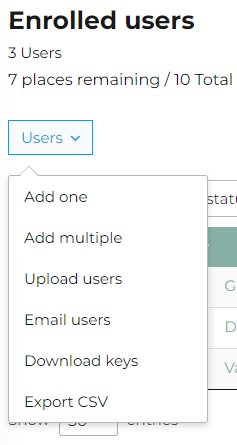
The next section of the page is the Enrolled Users list which contains two menus for the main management functions that are available to Group Leaders.
The first is the Enrolled Users list – the current list of your production group members, their email addresses, their status, and their enrollment key (more about keys and user status in other FAQs).

We’ve covered adding users elsewhere – but once users are set up on the system, Group Leaders have options to edit users’ details, send them a password reset, or to remove them from groups.
You can also send your users emails based on their status, directly from your dashboard. You can see their progress on the Group Management page and send emails to all – or to any combination of those who have (i) not enrolled yet, (ii) enrolled but not started, (iii) are in progress and/or (iv) have completed.
Editing User Details
On the Group Management page, click on a User’s name and a dialogue box appears.
You can edit their name and/or email address, then click Update user or dismiss the dialogue box with the ⊗ in the top right corner to leave details unchanged.

Password Reset
Select the check box next to one or more users’ names and further options appear next to the ‘Users’ button.
Click Send password reset and the user will be emailed a link to reset it. Individual users can also do this themselves from the login prompt using the ‘lost password’ link – provided they can remember the email they are registered under. Additionally, if the visit the My Courses page and they’re not logged in they also see the login / lost password options.

Removing Users
Again, select the user(s) you would like to remove from the Enrolled User list, and a Remove User(s) button will appear. Click on the Remove User(s) button. You will be prompted to confirm your action.
Reassigning Places
You can also move and reassign places on online courses. For example, if you assign a place to an individual who already has a valid PSP you can ‘unassign’ that place and it becomes available for reassignment to someone else.
There is no charge for this flexibility for our online courses – unless the individual has already started the course. The system won’t let you put multiple people through using a single place and just changing the name each time! There are some restrictions on this for courses with ‘in-person’ elements but we try to be as accommodating as possible.
Emailing Group Members
As a Group Leader you can easily email all members of your group based on their course status (Not enrolled, Not started, In progress and/or Completed). Clicking Users > Email Users brings up the email group members interface.
Emails sent via this interface use the Group Leader’s name as the From Name and the Group Leader’s email address as the Reply-to Email. The ‘From’ email address id set by the system to reduce the likelihood that emails are flagged as spam. Group members are sent the email via BCC, so no-one sees each others’ email addresses.
You can easily chase stragglers and/or congratulate successful completers without having to cut and paste into an email client.

Adding A User to a Group
When you click the Users button, you can choose between adding one user or adding multiple users. It also offers other options we’ll come to later.
If you select Add one, a form appears with two options:
- Add and invite user: Enter the user’s first name, last name, and email address to add them to a group. Once you click the Add User button, an email is sent to them. The user is added to the group, a place in your group is used up and their status is set to Not Started. NB If you add a user that already exists on the site, the system will spot that, automatically add them to the group and send them an email. They then occupy a seat in the group just like a new user.
- Send enrollment key: Enter the user’s first name, last name, and email address to send them the Send enrollment key email. Once that user registers and redeems that key, they take up a seat in the group, are enrolled in the group and can begin group courses.
We do not recommend the send enrolment key option. This means the person has to register on the site, faff about with keys and it’s all a bit unwieldy. There are occasions where you might need to send a user a lost key, but Option 1 is a far easier onboarding process for the user – and you still need to fill in the same info anyway.
Option 1 sets up an account for them if they don’t have one, sends out emails to confirm their details / set a password and enrols them on the course.
Adding Multiple Users
Users can be added in bulk by clicking Users > Add multiple, or by clicking Users > Upload Users and uploading a CSV file.
The Users > Add multiple presents you with a form with options very similar to those for a single user.

Uploading a CSV is the fastest, simplest way to onboard many users at the same time.
When you select Upload users there is a link to a CSV template file in the dialogue box tht appears. It only has four columns: user_email, user_pass, first_name and last_name. You can leave the user_pass column empty and the system will generate a random password for new users while leaving the passwords of existing users unchanged.
With the CSV upload option you can also choose not to send an email to the list of users you’re uploading. You might want to do this if you plan to distribute enrollment keys to your users in some other way.

RAW
This course will give users an introduction to health and safety in production. It will also act as a precursor to the Risk Management of Productions. The course aims to introduce candidates to safety basics such as legal requirements and risk assessment. It also aims to raise the awareness of health and safety on a production shoot, encourage crew to recognise when something is wrong and to change personal behaviours and attitudes towards health and safety while at work.
Who is it for?
The Risk Awareness (RAW) online course is aimed at those starting out on a production and in a non-managerial role.
Valid for 3 years
Production Safety Accredited (PSA1)
Self-Guided
Duration approx. 60 minutes

Safe Design and Construction of Sets
The course has been designed to help people understand key health and safety issues involved in design and construction safety relating to productions. The course emphasises the importance of identifying the hazards associated within the design, manufacture and build, as well the rigging & de-rigging of production sets.
Who is it for?
The course is aimed at Production Designers, Art Directors, Games Designers, Prop Buyers, Construction Managers, and Riggers etc. Essentially anyone who may be involved in the design, manufacture, build or purchase of any of the elements associated with a production set
Valid for 3 years
Company Course only
Duration 6 hours

Manual Handling
Lifting, carrying, pushing and pulling of loads can cause a range of injuries – from back problems to other musculoskeletal disorders. Training to lift and carry correctly forms an important part of reducing manual handling risks. This course is intended to give a very practical understanding of the risks involved and control measures required for lifting and carrying activities.
Who is it for?
Anyone who is likely to lift or carry as part of their daily role.
Valid for 3 years
Company Course only
Duration 2 hours

Psychological Safety in Productions
We have two Psychological Safety in Productions courses.
The course Working with Vulnerable Contributors aims to Identify and capture programme-related psychological risks by engaging with vulnerable contributors in a sensitive and constructive manner. The course also aims to help those involve protect their own mental wellbeing and build resilience.
The course Working with Difficult Content (e.g. imagery or audio) aims to bring awareness of the possible psychological impact of working with difficult content and the signs and reactions to look out for. It is intended to help create proactive working practices, and to minimise exposure to difficult content that may cause a psychological impact.
Company Course only

Risk Management of Productions
The course is designed to give you a broad overview of the factors to consider when working with productions or events, including Health, Safety and environmental issues. The course will aim to explain why risk management is needed in the production process and give practical methods of how it should be tackled.
Who is it for?
For those who manage people, safety on production and/or complete/approve risk assessments. This includes Executive Producers, Production Executives, Line Producers, Series Producers, Producers, Assistant Producers, Directors of Photography, 1st Assistant Directors, 2nd Assistant Directors, 3rd AD, Production Managers, Production Coordinators, HODs.
Valid for 3 years
Production Safety Accredited (PSA3)
Open Course and Company Course
Duration 6 hours

Mental Health First Aid
As an MHFAider® you will gain the knowledge and skills to spot the signs of a person experiencing poor mental health, the confidence to start a conversation, and the tools to signpost to appropriate support.
You’ll learn how to guide individuals toward professional help, practice active listening and empathy, and have meaningful conversations that break down stigma. This training also covers the crucial aspects of setting boundaries, maintaining confidentiality, and prioritising your own self-care.
Who is it for?
For anyone that wishes to have a deeper understanding of mental health and the factors that can affect people’s wellbeing
Valid for 3 years
Open Course (only in person)
Duration 2 full days